


stall not staying locked up
 Apr 6, 2014 | 06:32 PM
#1

Thread Starter
TECH Fanatic
iTrader: (5)
Joined: Nov 2005
Posts: 1,152
Likes: 0
From: Portsmouth, VA
 stall not staying locked up
i have searched and read a few of the older posts. here is my tune as it sits. i had the segment swap done by HPT and the truck drives great. put her on the highway and the stall locks and unlocks constantly. is it my misfire tables or something i change for the trans to keep the stall locked up cruising? i was at 2500 @ 70mph with 4.10 gears and a 245 75 16 rear tire.



 Apr 6, 2014 | 10:07 PM
#4
Thread Starter
TECH Fanatic
iTrader: (5)
Joined: Nov 2005
Posts: 1,152
Likes: 0
From: Portsmouth, VA
im not sure what it should be set at. i dont know if that is the way HPT set it up but they did the segment swap for me.
its funny how i stated i did a forum search and yet there is always a smart *** in the bunch.
its funny how i stated i did a forum search and yet there is always a smart *** in the bunch.
Apr 6, 2014 | 10:13 PM
#5

Bluecat Transmission Table Software
Download this free software on HPT, put all your info in and it will give you a good starting point for shifts, then adjust to your liking. Your tables are def a little jacked.
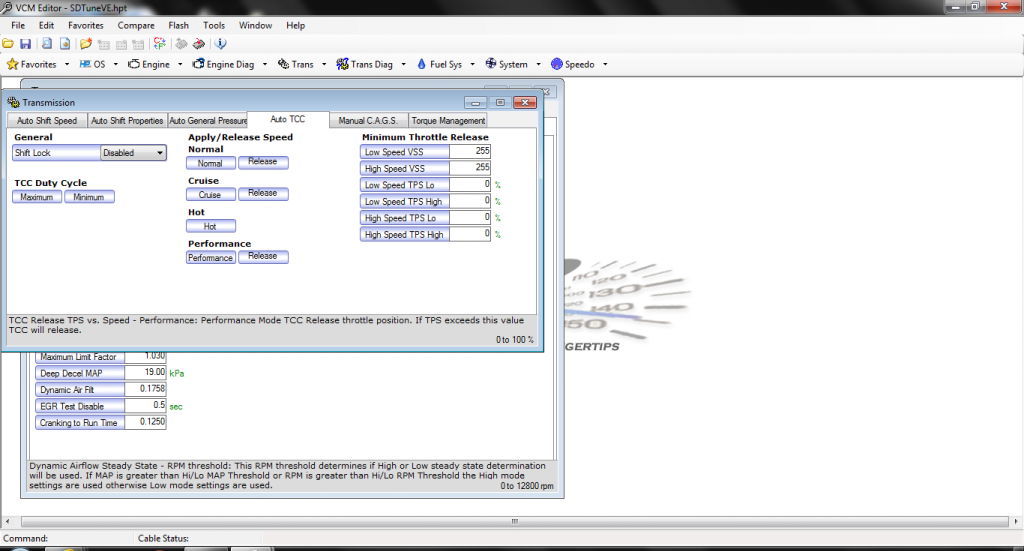
This is the minimum throttle tables, you can sett em like that or whatever works for you. I think most of your issues will be in the shift tables and TCC tables.
The misfire tables I would just max out or raise the Min enable temp up to like 260, you can try to tune them but with a cam I would just disable the misfire tables, that's just me though
Download this free software on HPT, put all your info in and it will give you a good starting point for shifts, then adjust to your liking. Your tables are def a little jacked.

This is the minimum throttle tables, you can sett em like that or whatever works for you. I think most of your issues will be in the shift tables and TCC tables.
The misfire tables I would just max out or raise the Min enable temp up to like 260, you can try to tune them but with a cam I would just disable the misfire tables, that's just me though
Apr 6, 2014 | 11:35 PM
#6
Thread Starter
TECH Fanatic
iTrader: (5)
Joined: Nov 2005
Posts: 1,152
Likes: 0
From: Portsmouth, VA
thats a neat little program. thanks for the heads up. i opened up my tune and used that program. just trying to see where i should copy and paste my recommended settings to in HPT. this is going to take some getting used to.
all the tables that i am reading on HPT are based on the throttle position % and the program i downloaded is based of vehicle MPH so i am a bit confused as to where i am supposed to make changes in my tune.
all the tables that i am reading on HPT are based on the throttle position % and the program i downloaded is based of vehicle MPH so i am a bit confused as to where i am supposed to make changes in my tune.
Last edited by greasemykey; Apr 7, 2014 at 12:00 AM.
Apr 7, 2014 | 01:22 AM
#7

Cdub81 posted the screen shot above of the Min. Throttle Release table, make those changes first and see what happens. That table is what is causing your unlocking on the highway. Once that table is set like shown then you can tweak your shift table and TCC lock/Unlock table.
Trending Topics
Apr 7, 2014 | 01:43 AM
#8
TECH Regular
Joined: Feb 2009
Posts: 406
Likes: 0
From: North Pole, Ak
I had this same problem when I first put in my PI 3k stall. This is what I did to fix it.
Set the TCC Min Duty Cycle to 90 and the TCC Max Duty Cycle to 100 across the board. Take it for a drive and see what that does for you. May also wish to increase the MPH / TP when the lock ups engage after the first suggestion. Use this at your own risk. Good luck.
Set the TCC Min Duty Cycle to 90 and the TCC Max Duty Cycle to 100 across the board. Take it for a drive and see what that does for you. May also wish to increase the MPH / TP when the lock ups engage after the first suggestion. Use this at your own risk. Good luck.
Apr 7, 2014 | 02:59 AM
#9
I had this same problem when I first put in my PI 3k stall. This is what I did to fix it.
Set the TCC Min Duty Cycle to 90 and the TCC Max Duty Cycle to 100 across the board. Take it for a drive and see what that does for you. May also wish to increase the MPH / TP when the lock ups engage after the first suggestion. Use this at your own risk. Good luck.
Set the TCC Min Duty Cycle to 90 and the TCC Max Duty Cycle to 100 across the board. Take it for a drive and see what that does for you. May also wish to increase the MPH / TP when the lock ups engage after the first suggestion. Use this at your own risk. Good luck.
The above table is the issue.
Apr 7, 2014 | 04:19 AM
#10
I had this same problem when I first put in my PI 3k stall. This is what I did to fix it.
Set the TCC Min Duty Cycle to 90 and the TCC Max Duty Cycle to 100 across the board. Take it for a drive and see what that does for you. May also wish to increase the MPH / TP when the lock ups engage after the first suggestion. Use this at your own risk. Good luck.
Set the TCC Min Duty Cycle to 90 and the TCC Max Duty Cycle to 100 across the board. Take it for a drive and see what that does for you. May also wish to increase the MPH / TP when the lock ups engage after the first suggestion. Use this at your own risk. Good luck.
thats a neat little program. thanks for the heads up. i opened up my tune and used that program. just trying to see where i should copy and paste my recommended settings to in HPT. this is going to take some getting used to.
all the tables that i am reading on HPT are based on the throttle position % and the program i downloaded is based of vehicle MPH so i am a bit confused as to where i am supposed to make changes in my tune.
all the tables that i am reading on HPT are based on the throttle position % and the program i downloaded is based of vehicle MPH so i am a bit confused as to where i am supposed to make changes in my tune.
This screenshot is with your gear, converter, 30.5 in tire and a 6200 rpm shift point. I just punched that in to give ya an idea of what it should look like.
The highlighted places are what I changed. Most are self explanatory but you can also hold your mouse over each one and it'll give a short description of what it does. You can change your idle rpm and D RPM (Downshift rpm max) as well as anything you like to whatever you prefer. When you've done that hit the export button I have circled in RED.

OK now a table like this will pop up

I just put in for a 4 speed trans and then the tables will populate, simply right click, highlight, copy and then paste into your tune. The first picture I showed with the half *** % symbol that is your throttle percentage and not mph... Mph is whats in the tables etc.
The red box I squared above needs to match your tables in hptuners so your MPH and shifts will be correct.

I noticed on mine it was always locking up 2-3 mph different than what I had set. Well tire size table was jacked and the table above was a little off:

The calculated tire will try and change once you put your new tire size in. Just type in the box the same number that you put in the top box, also make sure to check NO for rescale trans tables
Hope that helps man