


Activating E-Fans with Tech2
 Jun 3, 2008 | 09:03 PM
#1

Thread Starter


Joined: Jan 2006
Posts: 16,282
Likes: 438
From: Huntsville, AL
 Activating E-Fans with Tech2
Alrighty so I will be putting in my electric fans sometime this week hopefully, and the easiest way to activate them would be with a tech 2. I already have a tune (wait4me), but he doesnt like to answer emails and Im not looking forward to the 2 week downtime it would take to send it in. The cost of shipping will run me around $20 anyway, so if I can get it done at the dealer (tech2) for around that or less (.5 hours minimum), then I'll e happy.
The problem is, the dealership and the one other shop with a tech 2 thinks im nuts and it wont work so they wont even touch it. So, if anyone has experience with a tech 2 or has access to one and knows how to turn the electric fan option on and set the on/off temps, I would tremendously appreciate a walkthrough I can print out for them so I can get it done.
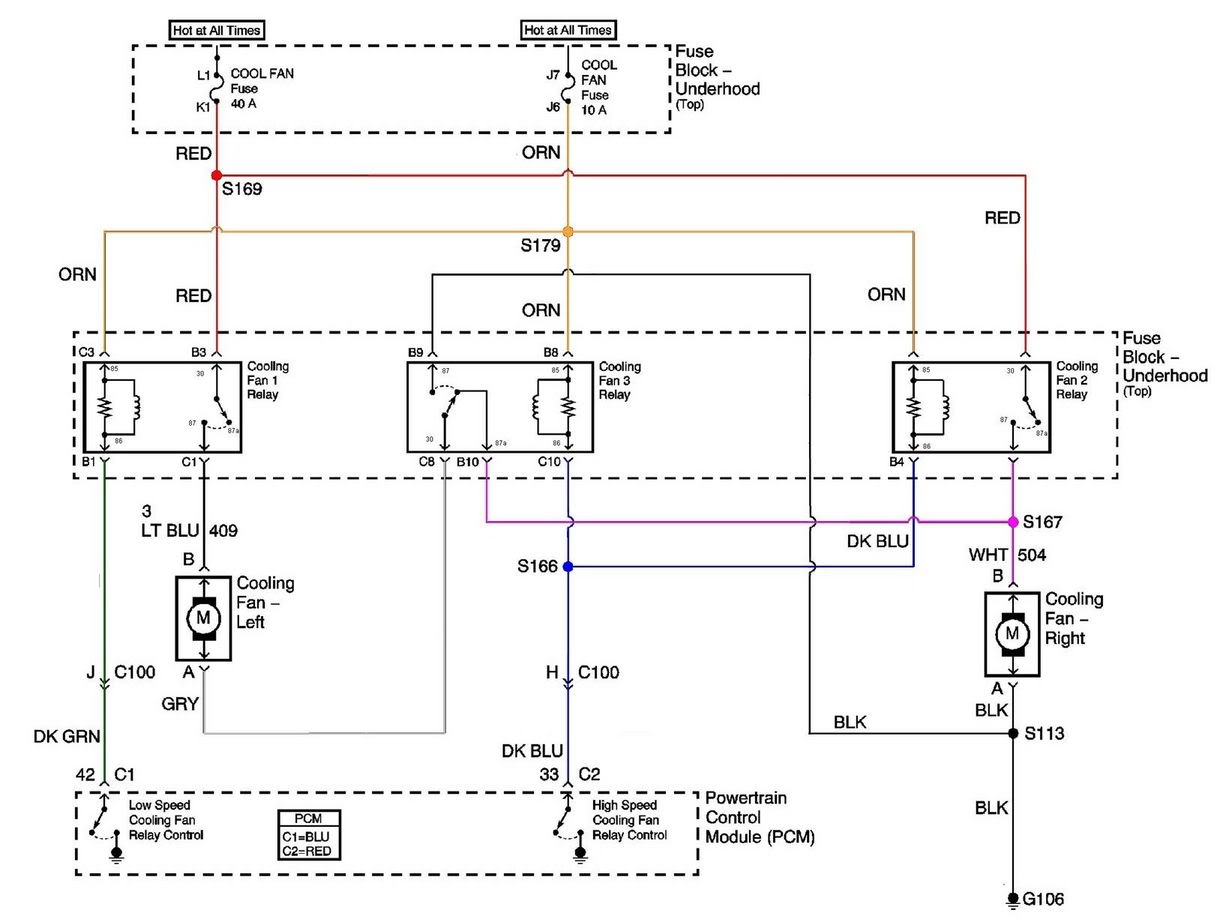
I made my harness today following this diagram:
And is this right for the on/off settings:
low:
coolant temp >202
a/c > 210
high:
coolant temp > 220
a/c > 265
Also, can they be set to turn off if I exceed 40mph with a tech2 (I know you can with hpt or efilive)? If not I can just wire in a toggle switch.
Thanks.
The problem is, the dealership and the one other shop with a tech 2 thinks im nuts and it wont work so they wont even touch it. So, if anyone has experience with a tech 2 or has access to one and knows how to turn the electric fan option on and set the on/off temps, I would tremendously appreciate a walkthrough I can print out for them so I can get it done.
I made my harness today following this diagram:
And is this right for the on/off settings:
low:
coolant temp >202
a/c > 210
high:
coolant temp > 220
a/c > 265
Also, can they be set to turn off if I exceed 40mph with a tech2 (I know you can with hpt or efilive)? If not I can just wire in a toggle switch.
Thanks.
Last edited by Atomic; Jun 3, 2008 at 09:21 PM.
Jun 5, 2008 | 06:48 PM
#3
Thread Starter
Joined: Jan 2006
Posts: 16,282
Likes: 438
From: Huntsville, AL
....mmk, well I have them setup manually for now with a dpdt switch in the cab...
install is here if anyone is interested: http://www.fullsizechevy.com/forums/...ml#post3286650
install is here if anyone is interested: http://www.fullsizechevy.com/forums/...ml#post3286650
Jun 6, 2008 | 03:55 PM
#4

....mmk, well I have them setup manually for now with a dpdt switch in the cab...
install is here if anyone is interested: http://www.fullsizechevy.com/forums/...ml#post3286650
install is here if anyone is interested: http://www.fullsizechevy.com/forums/...ml#post3286650
Sorry I don't have the answers to your question though....I have read about guys using HPtuners and EFI Live, but haven't heard anything about the TechII.
Jun 7, 2008 | 09:44 PM
#5

tech 2 wont work without a PCM out of a vehical with efans or a VCI number from GM technical support, and GM only will do a VCI number for a technical issue with a new car/truck
the VCI is where GM technical support goes in and does almost like a custom program for you and then the dealer can download the tune in TIS2web- the reflashing program for the dealer
but like i said- they wont just change software for a tune, you can energize the pcm output with it- but only for a service test, they will shut off once you exit out of the tech II screen
dont hold me to this 100%, but im a tech at a dealer, and me and a couple guys tried messing around with this for a while and it wouldnt work- i ended up with hptuners
the VCI is where GM technical support goes in and does almost like a custom program for you and then the dealer can download the tune in TIS2web- the reflashing program for the dealer
but like i said- they wont just change software for a tune, you can energize the pcm output with it- but only for a service test, they will shut off once you exit out of the tech II screen
dont hold me to this 100%, but im a tech at a dealer, and me and a couple guys tried messing around with this for a while and it wouldnt work- i ended up with hptuners
Jun 8, 2008 | 01:36 AM
#6
Thread Starter
Joined: Jan 2006
Posts: 16,282
Likes: 438
From: Huntsville, AL
Ah thanks, that was an answer I was looking for. Everyone I've asked said it cant be done, but I know there are options in the Tech2 for efans, I just didnt know what they did.
budhayes3, yea, I like switches : )
The switches on the left are for my bumper lights, reverse lights, and fans respecitvely. The 4 switches closer to the steering wheel are for my air horns, while the rocker is a master accessory on/off. I have 3 more rockers in the center under the vent for my two air compressors, and one to tie my stock horn in with my air horn.
budhayes3, yea, I like switches : )
The switches on the left are for my bumper lights, reverse lights, and fans respecitvely. The 4 switches closer to the steering wheel are for my air horns, while the rocker is a master accessory on/off. I have 3 more rockers in the center under the vent for my two air compressors, and one to tie my stock horn in with my air horn.
Trending Topics
Jun 8, 2008 | 06:31 PM
#8


Thread
Thread Starter
Forum
Replies
Last Post
dantheman1540
STEREO & ELECTRONICS
7
Feb 24, 2016 09:56 PM
lycominghunter
Tuning, Diagnostics, Electronics, and Wiring
26
Sep 25, 2015 07:50 AM
Velocity1
GMT 800 & Older GM General Discussion
6
Sep 22, 2015 01:32 PM
