


making videos Q
 Apr 18, 2006 | 08:36 PM
#1


 making videos Q
I figured it's about time I learn to use my video camera and x-fering the data/vids to my computer for sharing. I just need to know the very basics here, so any tips or advice would be appreciated.
I have a Canon Elura 50 with Canon Digital Video 7.0 and Canon DV Network ver. 1.0 software.
What do I need to do besides read these 3 manuals that are as dry as a popcorn fart?
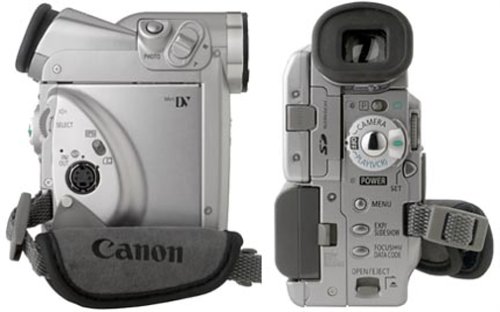
I have a Canon Elura 50 with Canon Digital Video 7.0 and Canon DV Network ver. 1.0 software.
What do I need to do besides read these 3 manuals that are as dry as a popcorn fart?
Apr 18, 2006 | 10:30 PM
#3

 bad Camera
You want some good advice? Get a new camera. The Canon Elura 50 was way over rated and had terrible video quality during action usage. The battery that came with it dies easily and the zoom quality sucks when you get into the digital zoom.
I use to work at Ritz Camera and sold those cameras. Lets just say I never sold one unless the customer actually came in for that one.
If you do go get a new one a Sony is the best now.
I use to work at Ritz Camera and sold those cameras. Lets just say I never sold one unless the customer actually came in for that one.
If you do go get a new one a Sony is the best now.
Apr 18, 2006 | 10:33 PM
#4
Originally Posted by riddick1224
You want some good advice? Get a new camera. The Canon Elura 50 was way over rated and had terrible video quality during action usage. The battery that came with it dies easily and the zoom quality sucks when you get into the digital zoom.
I use to work at Ritz Camera and sold those cameras. Lets just say I never sold one unless the customer actually came in for that one.
If you do go get a new one a Sony is the best now.
I use to work at Ritz Camera and sold those cameras. Lets just say I never sold one unless the customer actually came in for that one.
If you do go get a new one a Sony is the best now.
Apr 19, 2006 | 10:38 AM
#5

Is there a place for a small wire to connect to the camera? If there is, chances are that its an odd looking outlet and that would be fire wire... most computers have just begin to include it with a basic package.. but chances are if your comp is a few years old you will probably have to go to circuit city and buy a fire wire port or an external fire wire drive.. its not too expensive... you will not be able to connect the video-S to the computer and record it to the computer through that (i know that looks like the most obvious way to transfer it to the computer.. but that round port on the camera is simply for transfer to a tv or a computer with tv support)
you will probably want some editing software like roxio media creator 7 or something...when you plug the camera to the computer it will detect right away whats going on and you can begin recording the video and editing it as you like in a very easy program setup.
if you dont want to connect it by a cord, you will have to have the same port on your computer for the card to slide into... idk how common it is for a computer (usually laptop) to have a SD memory card drive.. its more common today.. but just a few years ago it wasnt common.
I'm making the videos for South East Muscle cars forums now.. so ive had a lot of experience with this.. if your not following anything im saying... pm me... if your not sure what cord you will need for the camera, take a picture of the area where the cord connects to and i will figure it out
you will probably want some editing software like roxio media creator 7 or something...when you plug the camera to the computer it will detect right away whats going on and you can begin recording the video and editing it as you like in a very easy program setup.
if you dont want to connect it by a cord, you will have to have the same port on your computer for the card to slide into... idk how common it is for a computer (usually laptop) to have a SD memory card drive.. its more common today.. but just a few years ago it wasnt common.
I'm making the videos for South East Muscle cars forums now.. so ive had a lot of experience with this.. if your not following anything im saying... pm me... if your not sure what cord you will need for the camera, take a picture of the area where the cord connects to and i will figure it out
Apr 19, 2006 | 02:29 PM
#6

Alright...layman's terms,
You have two ports on your camera to get video off. AND 1 port to get pictures off. Yes that's right the sd memory card is only for pictures.
Hold camera in hand, the side with the strap, you have a switch for tape/card. I believe up is tape and down is card. If you have it on card, the button next to the zoom slide is the camera button. If it's on tape, make sure your selector under the view finder is on camera (smae with taking pics) and push the button in the middle of the camera/player selector and have fun recording. Pushing pause alot makes editing MUCH MUCH easier.
Load your editing software...like SSlow 4.8 says, only newer coms have the fire wire (1394) ports, but if you have it...it makes for some really great video. Pop open the cover left front side. In there is the AV in/out and DV (Firewore 1394) in/out. If you have your editing software open and hook up to these jacks through what ever hardware (av support or 1394) the software recognize your camera in the "capture" mode.
Pics are different, under you battery is a door that has the charger(dc in) and USB terminal. Plug into here to get your pics on to the computer. Do this however you get pics onto your computer, meaning what ever software you already use.
I am not a ritz camera salesman, but I did sleep at a Holiday Inn last night.
**EDIT**
I forgot to mention, dv tapes aren't or doesn't mean digital information will be "uploaded" to your pc. You will have top play the tape (on player mode) while capturing the video thru the firewire or a/v cable. Digital just means more info in same amount of transferable space.(this means higher qulaity to you and me)
You have two ports on your camera to get video off. AND 1 port to get pictures off. Yes that's right the sd memory card is only for pictures.
Hold camera in hand, the side with the strap, you have a switch for tape/card. I believe up is tape and down is card. If you have it on card, the button next to the zoom slide is the camera button. If it's on tape, make sure your selector under the view finder is on camera (smae with taking pics) and push the button in the middle of the camera/player selector and have fun recording. Pushing pause alot makes editing MUCH MUCH easier.
Load your editing software...like SSlow 4.8 says, only newer coms have the fire wire (1394) ports, but if you have it...it makes for some really great video. Pop open the cover left front side. In there is the AV in/out and DV (Firewore 1394) in/out. If you have your editing software open and hook up to these jacks through what ever hardware (av support or 1394) the software recognize your camera in the "capture" mode.
Pics are different, under you battery is a door that has the charger(dc in) and USB terminal. Plug into here to get your pics on to the computer. Do this however you get pics onto your computer, meaning what ever software you already use.
I am not a ritz camera salesman, but I did sleep at a Holiday Inn last night.
**EDIT**
I forgot to mention, dv tapes aren't or doesn't mean digital information will be "uploaded" to your pc. You will have top play the tape (on player mode) while capturing the video thru the firewire or a/v cable. Digital just means more info in same amount of transferable space.(this means higher qulaity to you and me)
Last edited by dewmanshu; Apr 19, 2006 at 03:11 PM.
Trending Topics
 Thanx SSlow
Apr 19, 2006 | 08:47 PM
Thanx SSlow
Apr 19, 2006 | 08:47 PM
#9
Hey good news! My laptop comes with IEEE 1394 port so I think all I need is a 1394 wire and I should be good to go yes? no?
My computer came with Roxio Digital Media SE, will that work for me?
yes? no?My computer came with Roxio Digital Media SE, will that work for me?
Apr 19, 2006 | 09:09 PM
#10
Originally Posted by moregrip
Hey good news! My laptop comes with IEEE 1394 port so I think all I need is a 1394 wire and I should be good to go yes? no?
My computer came with Roxio Digital Media SE, will that work for me?
yes? no?My computer came with Roxio Digital Media SE, will that work for me?

Last edited by dewmanshu; Apr 19, 2006 at 09:33 PM.