


RAFIG and RAFPN process
 Mar 15, 2009 | 07:50 AM
#1

Thread Starter
Where's the Beef?
iTrader: (8)
Joined: Jan 2007
Posts: 9,382
Likes: 1
From: Dover, Oklahoma
 RAFIG and RAFPN process
can't seem to find any information on how to do this. I've been searching here, ls1tech, and EFI forum and can't find a write up on how to actually do it. The only things I'm finding i stalking about people needing to do it or have done it, but non on how to.
Anyone have a link to a write up?
Anyone have a link to a write up?
Mar 15, 2009 | 09:16 AM
#2

Check HPtuners. There is a custom .cfg file. Load it up, start the truck from dead cold and log using the .cfg file. Cut and paste the the new numbers in the RAFIN and RAFIG tables. Will take a couple days because you have to start from a dead cold start.
Mar 15, 2009 | 10:12 AM
#3

TECH Addict
Joined: Feb 2004
Posts: 2,120
Likes: 0
On EFILive.......
General (Petrol, Gas, Ethanol)......
>>> General Tuning Information >>>>.....
What to tune first.......
4.) Idle & Idle Transition Table....Click on Link....
great idle tuning information here by SSdDmon
or
http://forum.efilive.com/showthread.php?t=4661
General (Petrol, Gas, Ethanol)......
>>> General Tuning Information >>>>.....
What to tune first.......
4.) Idle & Idle Transition Table....Click on Link....
great idle tuning information here by SSdDmon
or
http://forum.efilive.com/showthread.php?t=4661
Mar 15, 2009 | 01:55 PM
#4

Trending Topics
Mar 17, 2009 | 03:11 AM
#9
Thread Starter
Where's the Beef?
iTrader: (8)
Joined: Jan 2007
Posts: 9,382
Likes: 1
From: Dover, Oklahoma
My cold start AFR used to be pretty good after I altered the A0008. But i'm out letting it completely warm by idle and the AFR is 18.8 I don't want to let it idle that lean so I'm waiting.
I've increased a0008 more but it doesn't seem to be helping
I've increased a0008 more but it doesn't seem to be helping
Mar 17, 2009 | 07:22 PM
#10
Thread Starter
Where's the Beef?
iTrader: (8)
Joined: Jan 2007
Posts: 9,382
Likes: 1
From: Dover, Oklahoma
Went ahead and logged RAFPN Instead of using the map, can I just highlight DashB like i did in this shot and add the avg amount to the desired airlow table?
In this case adding 2.23 to my P/N table.
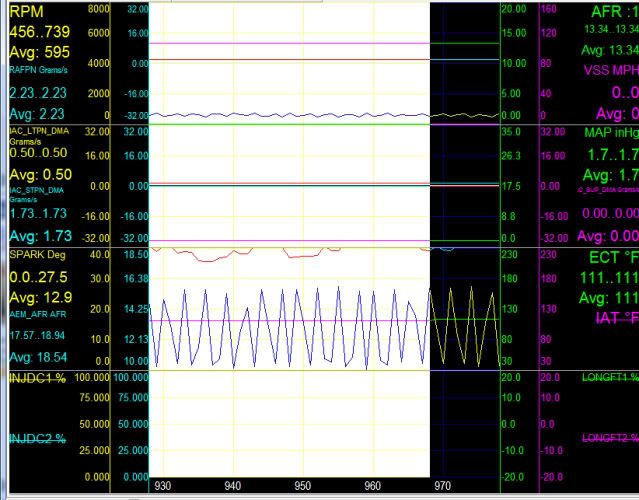
In this case adding 2.23 to my P/N table.

