


N E 1 Use a Autometer W/B 4 Hp Tuners?
 Apr 19, 2011 | 09:19 PM
#1

Thread Starter
TECH Fanatic
iTrader: (9)
Joined: Jul 2010
Posts: 1,012
Likes: 0
From: Bossier City, Lousiana
 N E 1 Use a Autometer W/B 4 Hp Tuners?
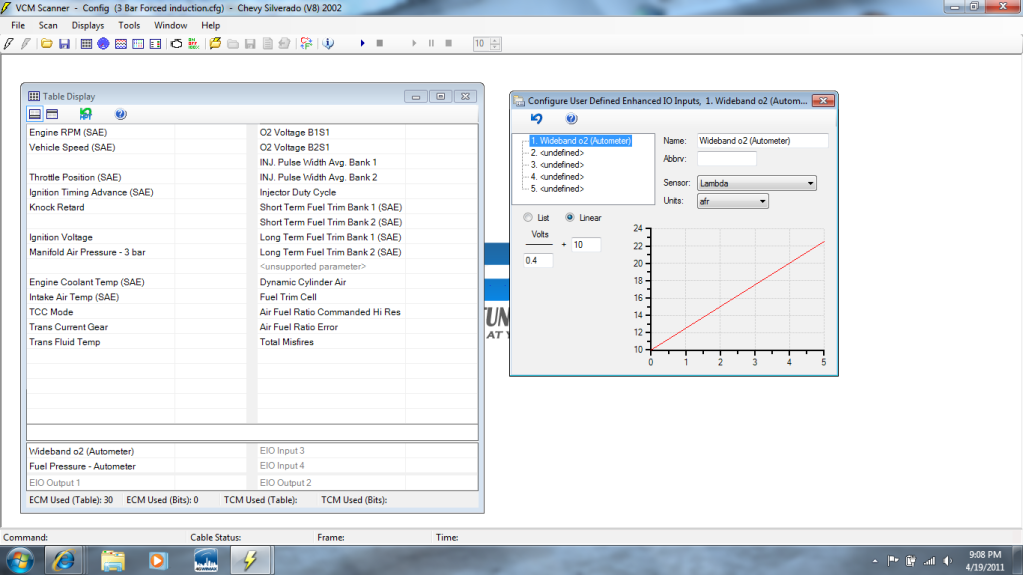
If anyone has set up an autometer wide band with hp tuners maybe you can answer some of my questions, i dont even bother to post no the hp tuner forum cause nobody ever answers! Any how im trying to set up the voltage reading for my 0-4v reference to hp tuners, the gauge in the truck for the wide band is spot on, but when i put it on hp tuners there is a significant difference in the reading (Leaner) any input will help alot...
Apr 19, 2011 | 10:07 PM
#2

I don't know if this will help you but have a look at this:
http://www.hptuners.com/forum/showthread.php?t=18780
You might need to join the forum.
I have the same wideband and am considering HP Tuners at the moment. Let us know if you figure it out.
http://www.hptuners.com/forum/showthread.php?t=18780
You might need to join the forum.
I have the same wideband and am considering HP Tuners at the moment. Let us know if you figure it out.
Apr 20, 2011 | 02:35 AM
#3

I use the predefined AEM input and it works pretty damn good.
The predefined input for the AEM is Volts/.5 + 10
The ".5" number is the slope of the line and figured by dividing the measureable range on the x-axis by the measureable range on the y-axis. For example the AEM gauge reads from 0-5 (5-0=5)volts and from 10-20 (20-10=10)afr. So 5/10 = .5
The "10" number is the y-intercept which is where the plot crosses the y-axis (when x = 0). In simpler terms this is the afr reading given by the gauge when the sensor is outputing 0 volts, which is the lowest possible afr reading for the gauge. In the case of the AEM it is 10.
Now, sometimes due to ground offsets and the orientation of the Earth to Jupiter the readout in HPT will differ slightly from the gauge. In this case you can play with these numbers to see what will get them closer to match (I have found that adjusting the slope is the best way but others may argue and changes made should be fairly small). The only problem with this is that the offsets will differ depending on the voltage output. I've seen guys nearly kill themselves trying to get it perfect at all afr readings but its nearly impossible.
Use a camera and snap shots of the gauge and HPT together instead of trying to move your eyes 9000 mph. Do this at idle and WOT (with a friend) to see what the differnce is. If its within .2 afr I'd call it good. You can also command different afr with the scanner and test at idle in the driveway.
Hope this helps.
The predefined input for the AEM is Volts/.5 + 10
The ".5" number is the slope of the line and figured by dividing the measureable range on the x-axis by the measureable range on the y-axis. For example the AEM gauge reads from 0-5 (5-0=5)volts and from 10-20 (20-10=10)afr. So 5/10 = .5
The "10" number is the y-intercept which is where the plot crosses the y-axis (when x = 0). In simpler terms this is the afr reading given by the gauge when the sensor is outputing 0 volts, which is the lowest possible afr reading for the gauge. In the case of the AEM it is 10.
Now, sometimes due to ground offsets and the orientation of the Earth to Jupiter the readout in HPT will differ slightly from the gauge. In this case you can play with these numbers to see what will get them closer to match (I have found that adjusting the slope is the best way but others may argue and changes made should be fairly small). The only problem with this is that the offsets will differ depending on the voltage output. I've seen guys nearly kill themselves trying to get it perfect at all afr readings but its nearly impossible.
Use a camera and snap shots of the gauge and HPT together instead of trying to move your eyes 9000 mph. Do this at idle and WOT (with a friend) to see what the differnce is. If its within .2 afr I'd call it good. You can also command different afr with the scanner and test at idle in the driveway.
Hope this helps.
Apr 20, 2011 | 07:07 AM
#4

I posted this here before however it may be burried in a post somewhere. Here is my write-up...
http://www.silveradoss.com/forums/to...ith-hp-tuners/
Good luck.
http://www.silveradoss.com/forums/to...ith-hp-tuners/
Good luck.
Apr 20, 2011 | 07:00 PM
#5
Thread Starter
TECH Fanatic
iTrader: (9)
Joined: Jul 2010
Posts: 1,012
Likes: 0
From: Bossier City, Lousiana
Awesome write up krambo, my gauge currently reads up to 17 so ill program it to read to 10-16 and set your same parameters!! Do you have a write up on how to set up this so it will read on the chart log? the one with the lines
Last edited by Swerve7rpm2000; Apr 20, 2011 at 07:10 PM.
Apr 21, 2011 | 09:10 PM
#6

http://www.hptuners.com/forum/showthread.php?t=18780
I have the same wideband and am considering HP Tuners at the moment. Let us know if you figure it out.
I have the same wideband and am considering HP Tuners at the moment. Let us know if you figure it out.
I use the predefined AEM input and it works pretty damn good.
The predefined input for the AEM is Volts/.5 + 10
The ".5" number is the slope of the line and figured by dividing the measureable range on the x-axis by the measureable range on the y-axis. For example the AEM gauge reads from 0-5 (5-0=5)volts and from 10-20 (20-10=10)afr. So 5/10 = .5
The "10" number is the y-intercept which is where the plot crosses the y-axis (when x = 0). In simpler terms this is the afr reading given by the gauge when the sensor is outputing 0 volts, which is the lowest possible afr reading for the gauge. In the case of the AEM it is 10.
Now, sometimes due to ground offsets and the orientation of the Earth to Jupiter the readout in HPT will differ slightly from the gauge. In this case you can play with these numbers to see what will get them closer to match (I have found that adjusting the slope is the best way but others may argue and changes made should be fairly small). The only problem with this is that the offsets will differ depending on the voltage output. I've seen guys nearly kill themselves trying to get it perfect at all afr readings but its nearly impossible.
Use a camera and snap shots of the gauge and HPT together instead of trying to move your eyes 9000 mph. Do this at idle and WOT (with a friend) to see what the differnce is. If its within .2 afr I'd call it good. You can also command different afr with the scanner and test at idle in the driveway.
...
The predefined input for the AEM is Volts/.5 + 10
The ".5" number is the slope of the line and figured by dividing the measureable range on the x-axis by the measureable range on the y-axis. For example the AEM gauge reads from 0-5 (5-0=5)volts and from 10-20 (20-10=10)afr. So 5/10 = .5
The "10" number is the y-intercept which is where the plot crosses the y-axis (when x = 0). In simpler terms this is the afr reading given by the gauge when the sensor is outputing 0 volts, which is the lowest possible afr reading for the gauge. In the case of the AEM it is 10.
Now, sometimes due to ground offsets and the orientation of the Earth to Jupiter the readout in HPT will differ slightly from the gauge. In this case you can play with these numbers to see what will get them closer to match (I have found that adjusting the slope is the best way but others may argue and changes made should be fairly small). The only problem with this is that the offsets will differ depending on the voltage output. I've seen guys nearly kill themselves trying to get it perfect at all afr readings but its nearly impossible.
Use a camera and snap shots of the gauge and HPT together instead of trying to move your eyes 9000 mph. Do this at idle and WOT (with a friend) to see what the differnce is. If its within .2 afr I'd call it good. You can also command different afr with the scanner and test at idle in the driveway.
...

When u say use a camera for snapshots of gauge & HPT, you're referring to doin that to get a simultaneous result, correct? Sure sounds like what is meant.
I posted this here before however it may be burried in a post somewhere. Here is my write-up...
http://www.silveradoss.com/forums/to...ith-hp-tuners/ ...
http://www.silveradoss.com/forums/to...ith-hp-tuners/ ...

 Apr 22, 2011 | 12:40 AM
#7
Yes, use the camera to take a shot to get a simultaneous result. You'll drive yourself crazy trying to look back and forth fast enough.
Trending Topics
Apr 22, 2011 | 08:36 AM
#8
This feature is used to get heat into the sensor prior to reporting values. Just wire the wideband power to an ACC (key on power) wire, turn your key on, wait the 20 seconds before starting your truck and you will capture the "start-up AFRs" if you so desire. There is no WOT delay / lag either. If set-up to read 10-16 AFR and the 4 volt slope is correct in your EIO, the "tightness" of this range allows for more bytes of data to be generated per given voltage output.

Thread
Thread Starter
Forum
Replies
Last Post


