


EFILive narrow band VE Tuning, am I doing it right so far?
 Jun 20, 2009 | 09:49 PM
#1

Thread Starter
TECH Apprentice
Joined: Dec 2002
Posts: 309
Likes: 0
From: Socal
 EFILive narrow band VE Tuning, am I doing it right so far?
Apologies for the giant noob question (AGAIN)...
Just got EFILive, and spent the afternoon gathering trim data for VE tuning. I've been following the "tuning trims.doc" file in the VE tuning guide sticky: https://www.performancetrucks.net/fo...d.php?t=346549
First thing I did was to disable the MAF and Long Term trims:
Flashed the PCM. Started truck. Ran crappy stopped in gear, even died once. No CEL on the "failed" MAF though (assume it was being cleared).
Started the tune tool, cleared the LTFT's (calibration->long term fuel trim, reset button).
Added PIDs SAE.SHRTFT1, SAE.SHRTFT2, GM.SHRTFTAVG1, GM.SHRTFTAVG2.
Loaded preset map {B0101} Main VE Table - STFT Bank 1 (and also 2) (Average)
Let truck warm up to operating temp. Hit record button. Drove around and tried to fill all the cells. Did a bit of 2nd gear driving on the freeway to do this.
Now I plan to paste this data into the main VE table. I'm not quite sure how this should be done....EFILive doesn't seem to have the option to "paste and multiply by %" as suggested in the "tuning trims.doc" file of the VE tuning guide sticky. Pasting by addition looks like it would result in a fairly similar effect.
I also notice I can look at the average and count values of the STFT data... the counts on some cells are much higher than others. I'm curious if the count data should be taken into effect... should values with very low counts be knocked out (or reduced)? Most cells have 30-100+ hits on them, but some have 1-5. Some of the big numbered cells have these very low counts. I could throw this stuff into a spreadsheet real quick to clean out these cells if need be.
Any suggestions appreciated, including "you have no idea what you're doing, please stop now before you hurt yourself." Screenshots of data coming momentarily.
Just got EFILive, and spent the afternoon gathering trim data for VE tuning. I've been following the "tuning trims.doc" file in the VE tuning guide sticky: https://www.performancetrucks.net/fo...d.php?t=346549
First thing I did was to disable the MAF and Long Term trims:
Engine Calibration.Fuel.Trim
{B3801} Long Term Fuel Trim Correction, changed from "Enable" to "Disable".
Engine Diagnostics.MAF
{C2901} MAF High Frequency Fail 1, changed from "13500" to "0".
{B3801} Long Term Fuel Trim Correction, changed from "Enable" to "Disable".
Engine Diagnostics.MAF
{C2901} MAF High Frequency Fail 1, changed from "13500" to "0".
Started the tune tool, cleared the LTFT's (calibration->long term fuel trim, reset button).
Added PIDs SAE.SHRTFT1, SAE.SHRTFT2, GM.SHRTFTAVG1, GM.SHRTFTAVG2.
Loaded preset map {B0101} Main VE Table - STFT Bank 1 (and also 2) (Average)
Let truck warm up to operating temp. Hit record button. Drove around and tried to fill all the cells. Did a bit of 2nd gear driving on the freeway to do this.
Now I plan to paste this data into the main VE table. I'm not quite sure how this should be done....EFILive doesn't seem to have the option to "paste and multiply by %" as suggested in the "tuning trims.doc" file of the VE tuning guide sticky. Pasting by addition looks like it would result in a fairly similar effect.
I also notice I can look at the average and count values of the STFT data... the counts on some cells are much higher than others. I'm curious if the count data should be taken into effect... should values with very low counts be knocked out (or reduced)? Most cells have 30-100+ hits on them, but some have 1-5. Some of the big numbered cells have these very low counts. I could throw this stuff into a spreadsheet real quick to clean out these cells if need be.
Any suggestions appreciated, including "you have no idea what you're doing, please stop now before you hurt yourself."
Screenshots of data coming momentarily.
Jun 21, 2009 | 02:18 PM
#3
Thread Starter
TECH Apprentice
Joined: Dec 2002
Posts: 309
Likes: 0
From: Socal
Anyone know if I'm using the right map....I assume I should be using the STFT table shown about given that LTFTs are disabled, correct? Please help, really want to apply the above results and go do another cycle or two today, but am very new to this!
Thanks!
Thanks!
Jun 21, 2009 | 02:24 PM
#4

get a wideband lol. Its a lot easier. ANd the cells with low counts can be cleared out in efilive. click map properties. Its right by the button that switches from cell count to cell value. Then click the tab that says empty. And set a value of at least 10 in there. And then back on the map page. Click the grid button that has a big red X on it. That should hide those cell. i doubt that makes sense lol....
Jun 21, 2009 | 03:11 PM
#5
Thread Starter
TECH Apprentice
Joined: Dec 2002
Posts: 309
Likes: 0
From: Socal
get a wideband lol. Its a lot easier. ANd the cells with low counts can be cleared out in efilive. click map properties. Its right by the button that switches from cell count to cell value. Then click the tab that says empty. And set a value of at least 10 in there. And then back on the map page. Click the grid button that has a big red X on it. That should hide those cell. i doubt that makes sense lol....
Regrettably wideband is going to have to wait, truck fund was empty even before I purchased EFILive, but I was sick of getting 14-15mpg even driving like grandma.
 Jun 22, 2009 | 07:57 PM
#7
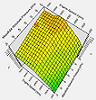
When doing ve tuning I like to get a cell count of at least 50 for as many cells as possible so you get a good chunk of data every time.
Tuning the ve table takes a long time if you want to get it dialed in correctly and make sure it has nice smooth transitions between all the cells. A rough ve table with mountains and ridges will give less than desirable results. Take your time with it and you will like the results much better, trust me.
It is also a really good idea if possible to do all the tuning of the ve and maf tables in the same day with steady air temps so you arent chasing your tail around because fuel trims will vary day to day due to temp, humidity, etc...
It all takes some time but modeling the airflow in the pcm via ve and maf tables is the MOST important part of tuning and where the most time needs to be spent so your fueling matches the airflow characteristics of the engine, drivability, fuel mileage, throttle response, etc... will all be much better in the end.
Tuning the ve table takes a long time if you want to get it dialed in correctly and make sure it has nice smooth transitions between all the cells. A rough ve table with mountains and ridges will give less than desirable results. Take your time with it and you will like the results much better, trust me.
It is also a really good idea if possible to do all the tuning of the ve and maf tables in the same day with steady air temps so you arent chasing your tail around because fuel trims will vary day to day due to temp, humidity, etc...
It all takes some time but modeling the airflow in the pcm via ve and maf tables is the MOST important part of tuning and where the most time needs to be spent so your fueling matches the airflow characteristics of the engine, drivability, fuel mileage, throttle response, etc... will all be much better in the end.
Last edited by KLUG'S SS; Jun 22, 2009 at 08:03 PM.
Trending Topics
Jun 22, 2009 | 08:09 PM
#8
And yes when you have the extra money I would definately make sure that a wideband is your next purchase because the stock narrowband sensors cannot be relied upon to tune WOT. Alot of people say that if they are reading around 890-900 mv at wot for a naturally aspirated engine is close but in fact it is not and have proved it quite a few times.
Last edited by KLUG'S SS; Jun 22, 2009 at 08:25 PM.
Jun 23, 2009 | 01:20 AM
#9
Thread Starter
TECH Apprentice
Joined: Dec 2002
Posts: 309
Likes: 0
From: Socal
Wasn't able to get it all done in one day, but temps/conditions are pretty stable here in socal in the early evening when I've been doing it.
For round 2, the numbers look pretty low...hiding values with less than 25 counts here (see attached)
For round 2, the numbers look pretty low...hiding values with less than 25 counts here (see attached)
Jun 23, 2009 | 01:22 AM
#10
Thread Starter
TECH Apprentice
Joined: Dec 2002
Posts: 309
Likes: 0
From: Socal
Here's the VE table with the first round of VE applied (what I was running today) to get the above table. Are these numbers small enough, or should I go for more iterations? Was expecting to do this quite a few times, but these seem low.
I wonder if I should just manually knock down the 400 RPM and 800 RPM rows by 5% and 2.5% respectively, rather than applying this data directly (i.e., in the interest of keeping it smooth, and not running the smoothing feature again on the whole dataset).
I wonder if I should just manually knock down the 400 RPM and 800 RPM rows by 5% and 2.5% respectively, rather than applying this data directly (i.e., in the interest of keeping it smooth, and not running the smoothing feature again on the whole dataset).
Last edited by endo; Jun 23, 2009 at 01:27 AM.

Thread
Thread Starter
Forum
Replies
Last Post
slowlsx
GM Parts Classifieds
1
Aug 13, 2015 08:28 PM
07NBSChevy
GM Drivetrain & Suspension
19
Aug 9, 2015 12:59 AM
