


VE Tuning With Wide Band Question


 Aug 4, 2009 | 08:06 PM
#12

Thread Starter
Joined: Mar 2004
Posts: 1,816
Likes: 57
From: 30 Miles North of Atlanta

One More and I'm ready to flash and log tomorrow. It's 9:00 pm here so I'll have to wait.
It says,
If you are going to reconnect and use the the MAF plug it in. I am.
Load the MAF - AFR Error.hst histogram.
It's the "MAF -" in front of the "AFR Error.hst histogram" that is throwing me off. Can you explain?
Sorry I just do not want to take anything for granted.
You almost have me there.... don't give up on me yet, Thanks.
It says,
If you are going to reconnect and use the the MAF plug it in. I am.
Load the MAF - AFR Error.hst histogram.
It's the "MAF -" in front of the "AFR Error.hst histogram" that is throwing me off. Can you explain?
Sorry
I just do not want to take anything for granted.You almost have me there.... don't give up on me yet, Thanks.
Aug 4, 2009 | 08:07 PM
#13


Joined: Jan 2006
Posts: 16,282
Likes: 438
From: Huntsville, AL
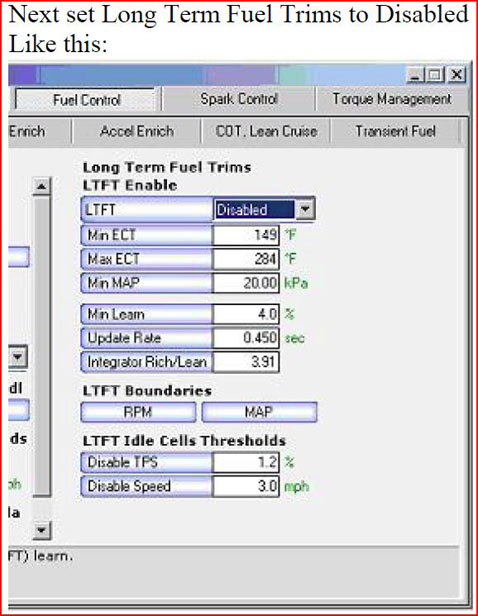
Engine > Fuel > OL & CL > Long Term Fuel Trims > LTFT Enable Min ECT = 280
I have COT disabled even though I still have cats, no problems.
The histo is logging AFR on the MAF frequency table, as opposed to the VE table. It should be one of those included histogram configs in the scanner. Click the folder on the histo table in the scanner to open new configs, and select the MAF-AFR file.
I have COT disabled even though I still have cats, no problems.
The histo is logging AFR on the MAF frequency table, as opposed to the VE table. It should be one of those included histogram configs in the scanner. Click the folder on the histo table in the scanner to open new configs, and select the MAF-AFR file.
Aug 4, 2009 | 08:23 PM
#14
Thread Starter
Joined: Mar 2004
Posts: 1,816
Likes: 57
From: 30 Miles North of Atlanta
Got it! Thanks, I cannot wait to get it done.
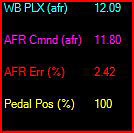
I have a WOT AFR error % as shown below. I have tried to tweak the EIO PLX with an offset with no luck so left it alone.
So now I presume this process will see the error and take it into consideration? Then after I an done the error should reduce on it's own with the gauge unchanged? Or do I have more work yet? Or is this sweating the small stuff @ a 2.4% error?
My pillar gauge reads like my commanded. The scanner shows the different as an error.
Thanks.
I have a WOT AFR error % as shown below. I have tried to tweak the EIO PLX with an offset with no luck so left it alone.
So now I presume this process will see the error and take it into consideration? Then after I an done the error should reduce on it's own with the gauge unchanged? Or do I have more work yet? Or is this sweating the small stuff @ a 2.4% error?
My pillar gauge reads like my commanded. The scanner shows the different as an error.
Thanks.
Aug 4, 2009 | 08:31 PM
#15
Joined: Jan 2006
Posts: 16,282
Likes: 438
From: Huntsville, AL
If the guage is showing different than the scanner, try this
http://www.hptuners.com/forum/showthread.php?t=24181
I doubt you will have this issue since you are using the pro version, but it couldnt hurt
If they are the same then you need to multiply the MAF table by the (2.42/2)= 1.21% in the correct frequency cell. Theoretically the error should be half as much now.
5% error is usually considered good, I have mine under 3%.
Also for part throttle, I would disable short term fuel trims after your first calibration, and reset fuel trims once in the scanner, that way trims wont be messing with the wideband.
http://www.hptuners.com/forum/showthread.php?t=24181
I doubt you will have this issue since you are using the pro version, but it couldnt hurt
If they are the same then you need to multiply the MAF table by the (2.42/2)= 1.21% in the correct frequency cell. Theoretically the error should be half as much now.
5% error is usually considered good, I have mine under 3%.
Also for part throttle, I would disable short term fuel trims after your first calibration, and reset fuel trims once in the scanner, that way trims wont be messing with the wideband.
Aug 4, 2009 | 09:00 PM
#17
You can have voltage offset problems with using the Pro version just as easily as logging through via a/c or egr. FWIW if I were you I would still make sure that your guage is matching what it is reading in the scanner.
Aug 4, 2009 | 09:40 PM
#18
17,16,15,14,13,12,11 Drvr
iTrader: (10)
Joined: Aug 2003
Posts: 6,713
Likes: 0
From: Mont Belvieu, Texas
open scanner click on help and a screen will appear click on help again then the help screen will open, to the left click on the work search and type in speed density from there it will walk you through the whole thing, good luck.
Aug 4, 2009 | 10:06 PM
#19
Thread Starter
Joined: Mar 2004
Posts: 1,816
Likes: 57
From: 30 Miles North of Atlanta
Thanks, They need to update the LTFT Disabe instruction. There is no switch.
Jul 20, 2010 | 02:02 PM
#20

in the custom EIO table, you need to modify your base number to get your readings to match better. for mine I went from 10 to 9.8 to adjust my HPT to read what the wideband is spitting out. It was easy I would do it.