


AC trigger wire for electric fans
 Jun 28, 2007 | 05:43 PM
#1

Thread Starter
TECH Enthusiast
iTrader: (3)
Joined: Nov 2005
Posts: 655
Likes: 0
From: West Des Moines, Iowa
 AC trigger wire for electric fans
I'm finally installing my LS1 fans that I've had since last fall and can't find a post that tells what pin/connector the AC trigger wire is supposed to be on. I've seen one post that said pin 32, but it's not quite right for an '03 I believe (that's the pin the '05's use, but I believe most of you with custom ones have used a different wire, right???) I think it's supposed to be a green/white stripe wire under the fuse panel, but I see like 4 or 5 green/white stripe wire under there.
I've printed off two "how to's", but both of them just say "tap into the AC switch wire" and don't get specific enough.
I've got just about everything else ready, just need to finish up the wiring into the truck, another coat of 'glass on the customized shroud, paint it, then download the tune updates.
I'll be posting pics of the customized shroud I made soon (so that the LS1 fans fit my bigger radiator), so long as everything else gets finished up in the wiring section that is...
I've printed off two "how to's", but both of them just say "tap into the AC switch wire" and don't get specific enough.
I've got just about everything else ready, just need to finish up the wiring into the truck, another coat of 'glass on the customized shroud, paint it, then download the tune updates.
I'll be posting pics of the customized shroud I made soon (so that the LS1 fans fit my bigger radiator), so long as everything else gets finished up in the wiring section that is...
 Jun 28, 2007 | 06:44 PM
#3
Thread Starter
TECH Enthusiast
iTrader: (3)
Joined: Nov 2005
Posts: 655
Likes: 0
From: West Des Moines, Iowa
Pin 42 of C1 on the PCM is the low speed turn on that everyone uses. I need the high speed enable for the AC turn on kick... I found one more "how to" that says to use pin 33 of C2 on the PCM, Dk Blue wire, will that work with AC enable?
According to this how-to:
C1 = blue, pin 42 = low speed turn on with temp set in PCM tune
C2 = red, pin 33 = high speed enable with AC turn on
I'm using the 3 relay setup for those that don't know...
According to this how-to:
C1 = blue, pin 42 = low speed turn on with temp set in PCM tune
C2 = red, pin 33 = high speed enable with AC turn on
I'm using the 3 relay setup for those that don't know...
Jun 28, 2007 | 07:01 PM
#4

The 3 relay setup that I have only uses pin 42. Not that it can't be done, but I have never seen one built that uses the second pcm output. If you have a harness that uses the pcm output for high speed fan enable with A/C then why do you need to tap into the A/C switch wire? Can't you just use the signal from the pcm to command the relays to do what is needed. Maybe I just don't understand what your dealing with. Is there any way you can post a wiring diagram?
Jun 28, 2007 | 07:41 PM
#5
Pin 33 on C2 is the correct one for High Speed Cooling Fan Relay Control. However, if you are trying to use that instead of taping into the A/C wire and you are using a standard harness like Nelson or Derek makes then you will probably have to re-wire it to accept a negative signal instead of a positive for the High speed control. I can't guaranty that though. I would just guess that since the low speed control trigger is a negative one that the high speed trigger probably is too. Here is an excel file with the map to the 2005 pcm connectors. It should be the same as a 2003 only the 2003 has the pins you need listed as "not used" and it has Blue and Green connectors instead of Blue and Red. I have a file for 2003 if you want it too.
Jun 28, 2007 | 07:49 PM
#6

I believe pin 33 only works on 03+ trucks. From what I have read if you use the AC trigger wire then the fans will cycle on and off each time the compress cycles on and off. If you use the PCM pins 42 and 33 you have much more control escpecially if you have the fans programed with EFI Live, I don't know if HP tuners allows you to control the fans according to AC pressures.... Perhaps someone with HP tunners can comment...
EFI Live settings

EFI Live settings
Jun 28, 2007 | 10:24 PM
#7
There are no A/C control setting for the fans in HP Tuners currently. Only Fan 1 and Fan 2 on/off temp settings. There is a request to add the A/C control features on the message board so hopefully they will add it.
http://www.hptuners.com/forum/showth...2923#post92923
Anyone with HPT that is interested in these features post up over there and maybe that will give them incentive to add them.
http://www.hptuners.com/forum/showth...2923#post92923
Anyone with HPT that is interested in these features post up over there and maybe that will give them incentive to add them.
Last edited by truckmann; Jun 28, 2007 at 10:34 PM.
Trending Topics
Jun 28, 2007 | 10:52 PM
#8

Originally Posted by BlackGMC
I believe pin 33 only works on 03+ trucks. From what I have read if you use the AC trigger wire then the fans will cycle on and off each time the compress cycles on and off. If you use the PCM pins 42 and 33 you have much more control escpecially if you have the fans programed with EFI Live, I don't know if HP tuners allows you to control the fans according to AC pressures.... Perhaps someone with HP tunners can comment...
EFI Live settings
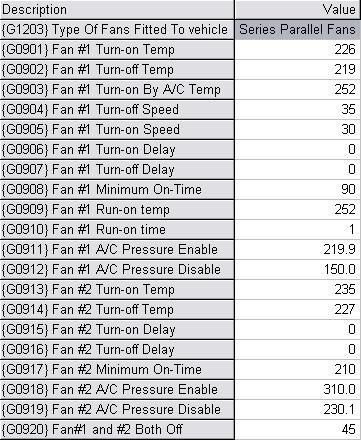
EFI Live settings
Jun 28, 2007 | 11:04 PM
#9
Yes and no.... One would need to verify if it is a (+) or (-) signal from pin 33... I would assume that it is a (-) signal. The wire tapped in to the a/c wire needs a (+) signal so I think you would just have to swap a couple wires around on that relay so it is activated by the (-) signal from the pcm.
Jun 29, 2007 | 01:01 AM
#10

Originally Posted by truckmann
Yes and no.... One would need to verify if it is a (+) or (-) signal from pin 33... I would assume that it is a (-) signal. The wire tapped in to the a/c wire needs a (+) signal so I think you would just have to swap a couple wires around on that relay so it is activated by the (-) signal from the pcm.